
Imagine this.
Your production team is ready. Machines are available. Workers have reported on time. A customer is waiting for delivery.
Then someone from stores walks into your cabin and says,
"Sir, the bearing hasn't arrived yet."
Production stops.
One missing component can delay an entire manufacturing schedule. It doesn't matter whether you manufacture pumps in Rajkot, automotive parts in Pune, food products in Ahmedabad, or industrial machinery in Coimbatore. Material shortages remain one of the biggest reasons factories lose money every single day.
The surprising part?
Most shortages don't happen because suppliers fail. They happen because the purchasing process depends on spreadsheets, phone calls, WhatsApp messages, or someone's memory.
By the time the purchase team realises stock is running low, it's already too late.
This is exactly where Odoo ERP for Manufacturing steps in to change how factories operate.
Instead of waiting for shortages to happen, Odoo continuously monitors inventory, understands production demand, predicts procurement needs, and automatically prepares purchase requests before production is affected.
Rather than reacting to problems, manufacturers start preventing them with Odoo.
In this article, I'll explain how procurement automation actually works inside Odoo, which modules are involved, how Indian manufacturers are using it to reduce delays, and why procurement is no longer just a purchasing activity—it's becoming one of the biggest competitive advantages in manufacturing.
Why Do Manufacturers Still Face Raw Material Shortages?
Raw material shortages usually occur because purchasing decisions are reactive rather than planned. Manual tracking, poor inventory visibility, and disconnected production schedules make it difficult to order materials at the right time. Odoo ERP for Manufacturing solves this by connecting purchasing with inventory and production planning in real time.
If you've worked inside a factory, you've probably heard one of these statements:
- "We thought enough stock was available."
- "Purchase order wasn't approved."
- "Supplier hasn't dispatched yet."
- "Nobody informed the purchase department."
- "Production requirements changed yesterday."
None of these are actually procurement problems.
They're information problems.
Most factories still use multiple systems:
- Excel for inventory
- Email for approvals
- WhatsApp for urgent purchases
- Phone calls to suppliers
- Manual registers in stores
Now imagine trying to coordinate production using five different sources of information.
Eventually, something gets missed.
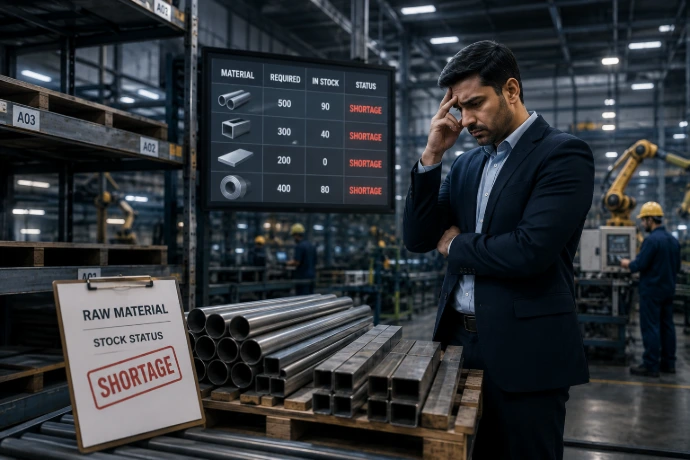
Common Reasons Behind Material Shortages
| Challenge | Business Impact |
| No real-time inventory visibility | Unexpected stock-outs |
| Manual purchase planning | Delayed ordering |
| Production changes not communicated | Wrong procurement quantities |
| Supplier performance unknown | Late deliveries |
| No demand forecasting | Emergency purchases |
| Poor approval process | Purchase delays |
Most companies don't lack hardworking employees.
They lack a connected system.
That's why even experienced purchase managers struggle to avoid shortages.
What Is Procurement Automation in Manufacturing?
Procurement automation means using software to manage purchasing activities automatically based on production demand, inventory levels, supplier data, and predefined business rules. Instead of relying on manual follow-ups, the ERP system performs routine procurement tasks with minimal human intervention.
Think about your smartphone.
You don't manually save every contact anymore. Your phone automatically syncs everything.
Procurement automation works in a similar way.
Instead of asking the purchasing department to constantly monitor inventory, the ERP system continuously tracks stock levels.
Whenever predefined conditions are met, it automatically creates procurement activities.
For manufacturers, procurement automation includes:
- Monitoring raw material availability
- Predicting future demand
- Creating purchase requests
- Comparing supplier prices
- Managing approval workflows
- Tracking deliveries
- Updating inventory automatically
The objective isn't replacing your purchase team.
It's removing repetitive manual work so they can focus on negotiations, supplier relationships, and strategic purchasing.
Manual Procurement vs Odoo Procurement Automation
| Manual Procurement | Odoo ERP for Manufacturing |
| Excel tracking | Live inventory monitoring |
| Phone calls | Automatic notifications |
| Manual calculations | Smart replenishment rules |
| Human reminders | Automated procurement planning |
| Reactive buying | Predictive purchasing |
| Multiple spreadsheets | Single integrated platform |
Notice the difference?
Manual procurement reacts.
Automated procurement predicts.
That single shift can significantly reduce production delays.
How Does Odoo ERP for Manufacturing Automate Procurement?
Odoo automates procurement by connecting sales, inventory, production, purchasing, and warehouse operations into one workflow. As production demand changes, the system automatically calculates material requirements and generates procurement actions before shortages occur.
Many people assume procurement starts when someone raises a purchase request.
That's not how modern ERP works.
In Odoo, procurement actually begins much earlier.
It starts the moment customer demand enters the system.
Let's understand the complete workflow.
Step 1: Customer Demand Enters the ERP
Demand can come from multiple sources:
- Sales Orders
- Forecast Planning
- Manufacturing Schedule
- Minimum Stock Rules
- Reordering Rules
Instead of treating purchasing separately, Odoo first understands why materials are required.
This creates much better purchasing decisions.
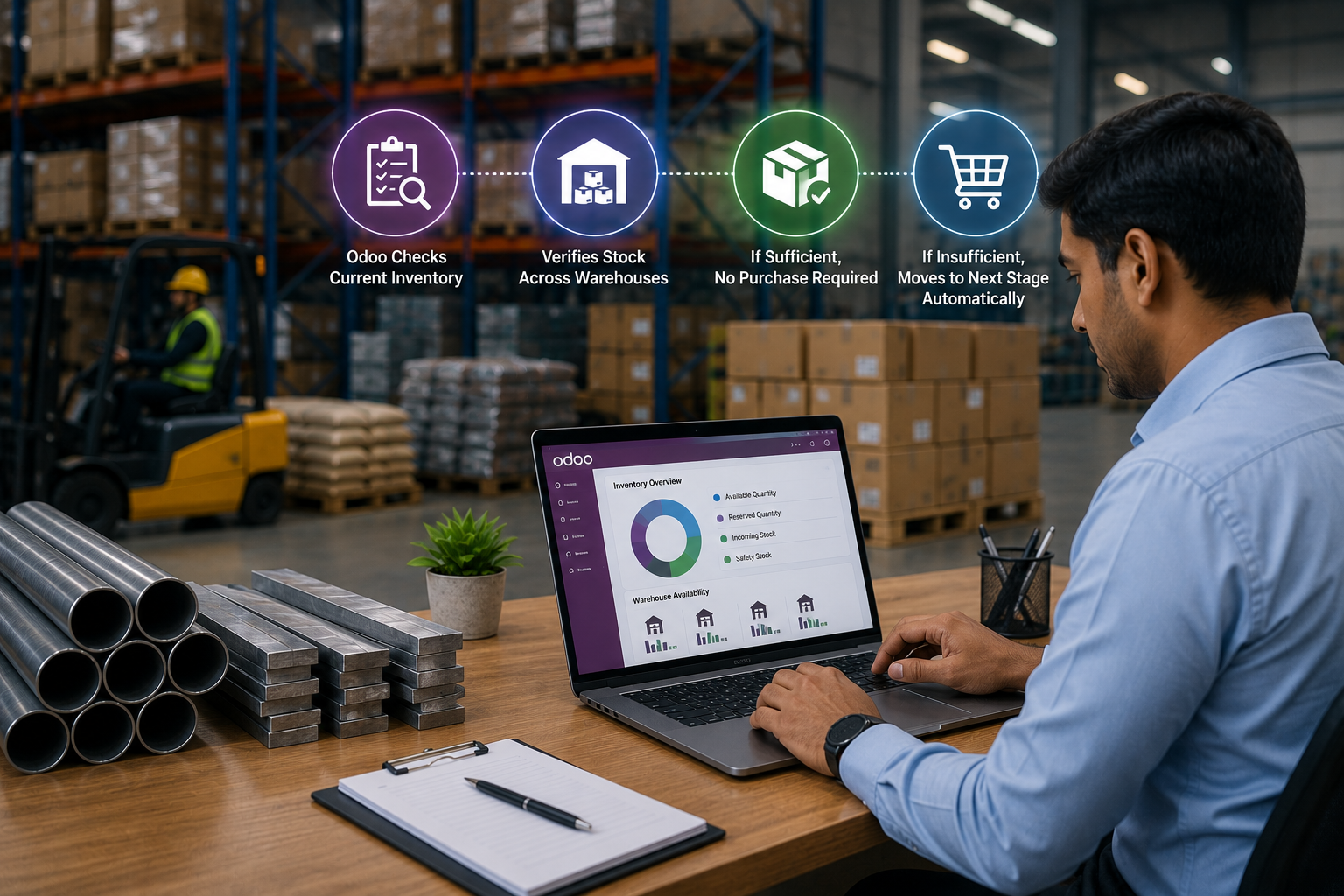
Step 2: Odoo Checks Current Inventory
The Inventory module immediately verifies:
- Available Quantity
- Reserved Quantity
- Incoming Stock
- Safety Stock
- Warehouse Availability
- Multiple Warehouse Stock
If sufficient inventory already exists, no purchase is required.
If stock is insufficient, Odoo moves to the next stage automatically.
Step 3: Bill of Materials (BoM) Analysis
Now comes one of Odoo's strongest capabilities.
Every manufactured product is built using a Bill of Materials (BoM).
A BoM defines:
- Raw materials
- Components
- Consumables
- Quantities required
- Alternative materials (if configured)
Suppose you're manufacturing industrial pumps.
The BoM may include:
- Cast Iron Body
- Shaft
- Bearings
- Mechanical Seal
- Fasteners
- Paint
- Packaging Materials
If an order for 500 pumps is confirmed, Odoo instantly calculates the exact quantity of every component required.
No manual calculation.
No Excel formulas.No estimation.
Just accurate planning.
Step 4: Material Requirement Planning (MRP)
This is where automation becomes truly valuable.
The Manufacturing (MRP) module compares:
- Production demand
- Existing inventory
- Reserved stock
- Open purchase orders
- Lead times
- Supplier delivery schedules
Based on this analysis, Odoo identifies exactly which materials need to be purchased, in what quantity, and by when.
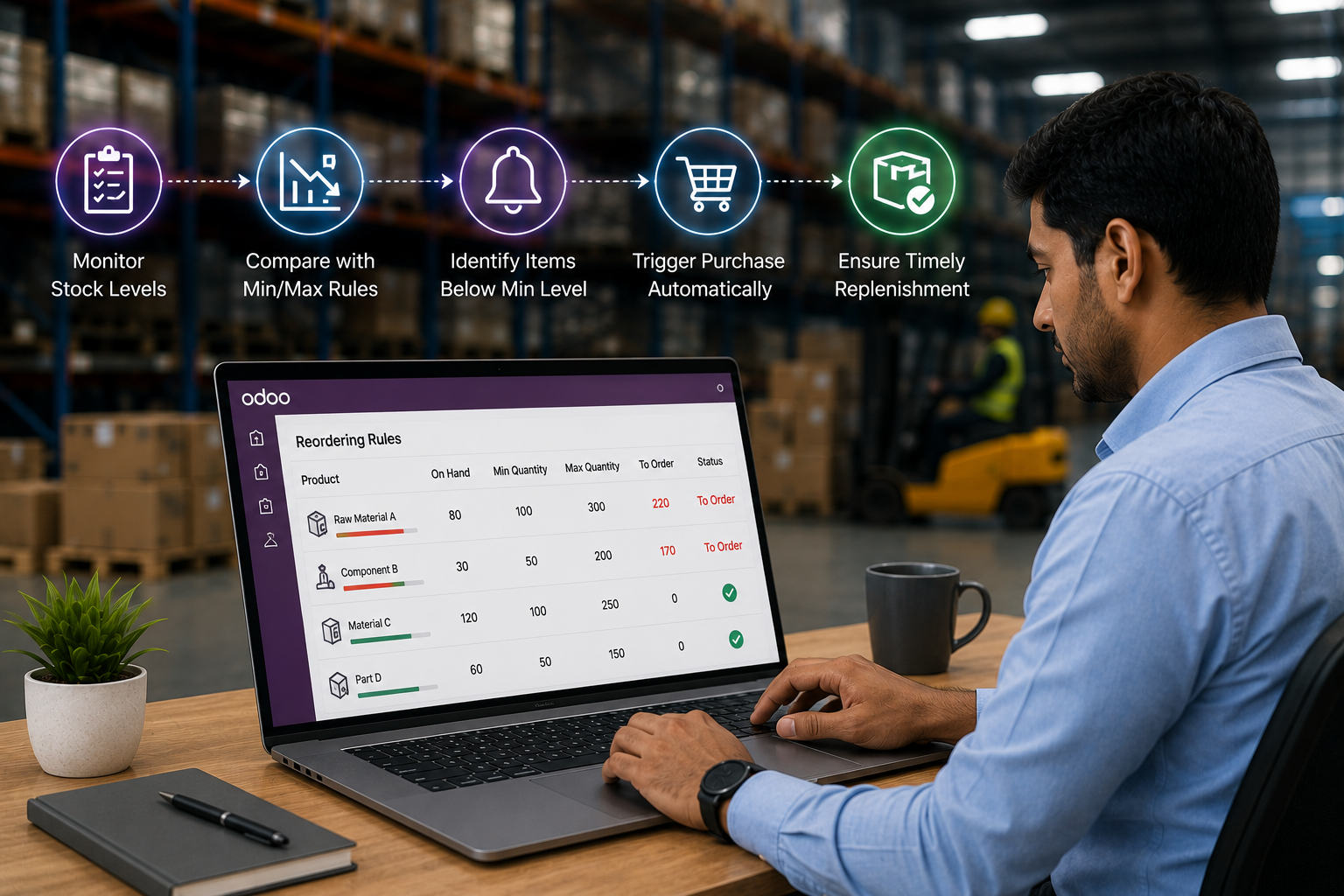
Step 5: Reordering Rules – Odoo Knows When It’s Time to Buy
After calculating the exact material requirement through MRP, Odoo doesn’t simply leave the information on a dashboard and expect someone to remember it.
Instead, it checks the available stock against the Reordering Rules you've already defined.
Think of Reordering Rules as the purchasing team’s silent assistant. They continuously monitor inventory and trigger replenishment whenever stock drops below the predefined level.
For every raw material, you can define:
- Minimum Quantity
- Maximum Quantity
- Preferred Supplier
- Procurement Route
- Lead Time
- Multiple Warehouse Rules (if applicable)
Let’s understand this with a practical example.
Imagine you’re manufacturing industrial pumps.
One of your products requires a mechanical seal. Your factory normally keeps between 200 and 800 seals in stock because supplier delivery takes around 8 days.
You configure Odoo like this:
| Setting | Example |
| Minimum Stock | 200 Units |
| Maximum Stock | 800 Units |
| Lead Time | 8 Days |
| Procurement Method | Buy |
As production consumes seals, Odoo keeps checking the live inventory.
The moment available stock falls below 300 units, the system automatically identifies that replenishment is required.
Nobody has to remember it.
Nobody has to maintain a separate Excel reminder.
The ERP simply follows the business rule you’ve already defined.
This is one of the biggest reasons manufacturers reduce emergency purchasing after ERP implementation.
Step 6: Odoo Automatically Creates a Request for Quotation (RFQ)
Once Odoo determines that additional material is required, the next question is obvious:
Who should supply it?
Instead of waiting for the purchase executive to manually prepare documents, Odoo creates a Request for Quotation (RFQ) using the supplier information already available in the system.
The RFQ includes information such as:
- Material Name
- Required Quantity
- Expected Delivery Date
- Supplier Details
- Purchase Conditions
- Company Information
The purchase executive only needs to review the details before sending the quotation request to the supplier.
This reduces repetitive work and ensures that procurement starts immediately instead of waiting for manual preparation.
More importantly, every RFQ is stored inside the ERP.
That means your team can always check:
- Who requested the quotation?
- When it was created
- Which supplier received it
- Whether the supplier responded
- What price was quoted
Nothing gets lost in email threads or WhatsApp conversations.
Step 7: Smart Vendor Selection Instead of Guesswork
Receiving quotations from multiple suppliers is only useful if you can compare them properly.
Many factories still compare supplier prices manually.
One quotation arrives by email.
Another arrives as a PDF.
Someone updates an Excel sheet.
Eventually, purchasing decisions depend more on memory than data.
Odoo changes this completely.
Every approved supplier has a dedicated profile that stores:
- Purchase History
- Product-wise Pricing
- Delivery Performance
- Supplier Lead Time
- Previous Purchase Orders
- Contact Information
- Payment Terms
When the RFQ is generated, buyers can quickly compare multiple vendors before placing the order.
Suppose your company purchases stainless steel sheets.
Three approved suppliers provide quotations.
| Supplier | Price | Lead Time | Payment Terms |
| Supplier A | ₹238/kg | 8 Days | 30 Days |
| Supplier B | ₹241/kg | 4 Days | Advance |
| Supplier C | ₹236/kg | 12 Days | 45 Days |
Which supplier should you choose?
The answer depends on the production schedule.
If manufacturing needs the material within five days, selecting the lowest price could actually become the most expensive decision because delayed production costs far more than a few rupees per kilogram.
Since Odoo stores supplier history, buyers can evaluate vendors based on multiple factors rather than price alone.
This leads to smarter purchasing decisions and stronger supplier relationships over time.
Step 8: Purchase Approval Without Endless Follow-ups
One of the most common reasons procurement gets delayed isn’t the supplier.
It’s the approval process.
Many manufacturing companies still depend on phone calls, printed documents, or WhatsApp messages for purchase approvals.
As the organisation grows, this becomes increasingly difficult to manage.
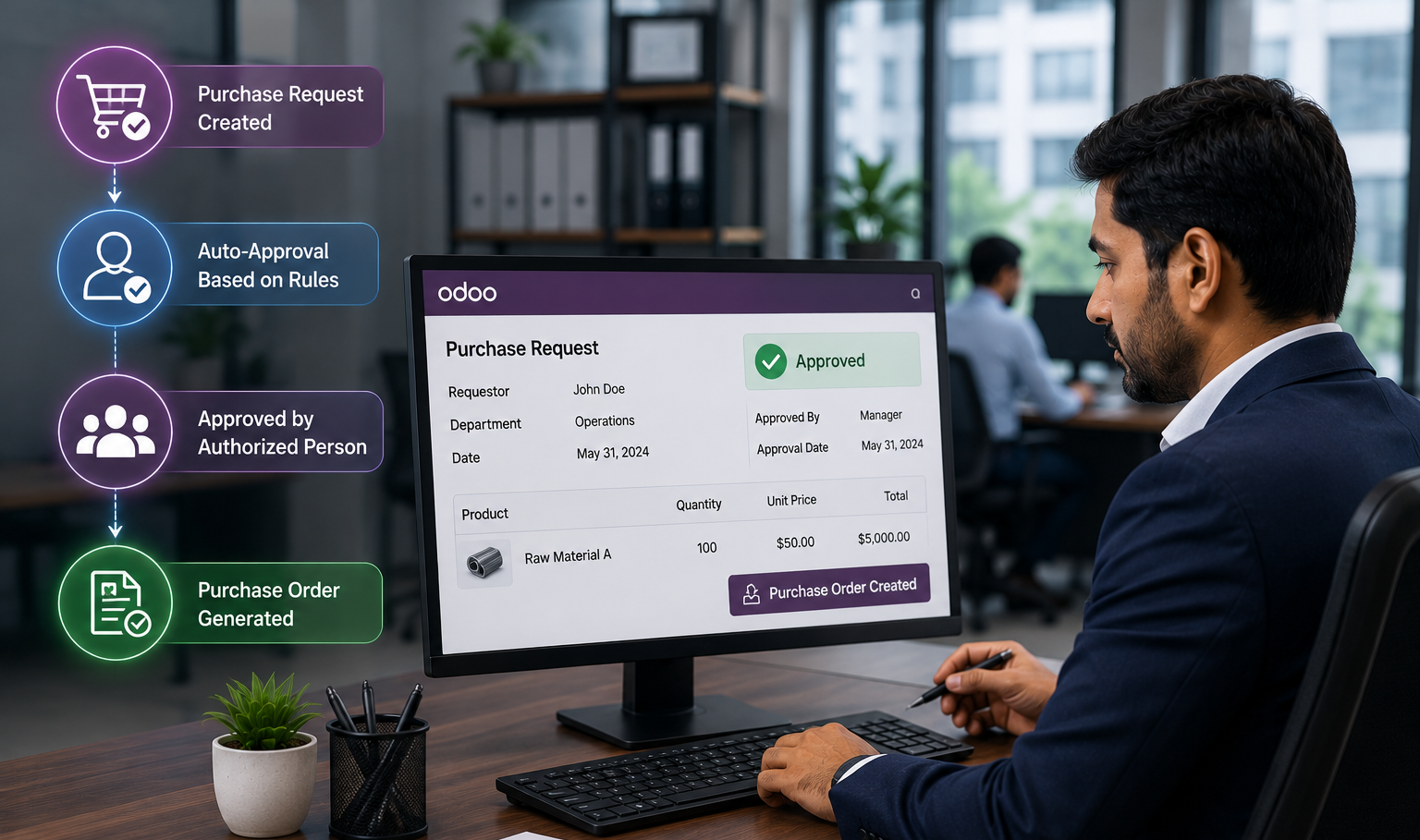
Odoo solves this by introducing configurable approval workflows.
Instead of chasing approvals manually, every purchase request is automatically sent to the right decision-maker based on your company's approval policy.
For example:
| Purchase Value | Approval Authority |
| Up to ₹25,000 | Purchase Executive |
| ₹25,001 – ₹2,00,000 | Purchase Manager |
| Above ₹2,00,000 | Director or Management |
Whenever an RFQ is ready, Odoo automatically sends it to the right approver.
Approvers receive notifications and can review:
- Supplier Details
- Material List
- Quantities
- Purchase Value
- Delivery Schedule
- Supporting Documents
Once approved, the workflow continues automatically.
There is no confusion about whether someone has seen the request or not.
Everyone involved works with the same real-time information.
This not only speeds up procurement but also improves transparency and accountability across departments.
At this stage, the purchasing decision has been approved, the supplier has been selected, and everything is ready for order placement.
The next stage is where procurement becomes a physical process—issuing the Purchase Order, receiving materials, inspecting quality, and updating inventory automatically. We’ll continue with that in the next section.
Step 9: Purchase Order Creation – From Approval to Action
Once the purchase request is approved, Odoo converts the approved Request for Quotation (RFQ) into a Purchase Order (PO) with just a few clicks.
This might sound like a small step, but it’s where many manual procurement processes slow down. Someone has to prepare the PO, verify quantities, check prices again, attach terms and conditions, and email it to the supplier.
With Odoo ERP for Manufacturing, most of this information is already available because it has flowed through the earlier procurement stages.
The Purchase Order automatically includes:
- Supplier details
- Material description
- Ordered quantity
- Agreed price
- Taxes and GST details
- Delivery schedule
- Payment terms
- Company information
Since the PO is generated from the approved RFQ, there is no need to enter the same information twice. This reduces manual work and minimises typing errors.
More importantly, every Purchase Order is linked to the procurement history, making it easy to track who requested it, who approved it, and when it was sent to the supplier.
Step 10: Goods Receipt – Real-Time Inventory Updates
Placing a Purchase Order is only half the process.
The real value comes when materials arrive at your warehouse.
In many factories, the purchase team believes materials have been received, while the warehouse team is still updating registers or Excel sheets. By the time inventory is updated, production planning is already working with outdated information.
Odoo eliminates this gap.
As soon as the supplier delivers the materials, the warehouse team records the receipt directly in the ERP.
Using the Barcode module, they can scan products instead of entering information manually.
The system instantly updates:
- Available stock
- Reserved stock
- Warehouse location
- Batch or Lot number
- Serial number (if applicable)
- Incoming quantity
This means everyone—from the purchase department to production planning—sees the updated inventory in real time.
No phone calls.
No waiting for someone to update an Excel file.
No confusion about whether the material has actually arrived.
For manufacturers managing multiple warehouses or storage locations, this visibility becomes even more valuable because every movement is recorded automatically.
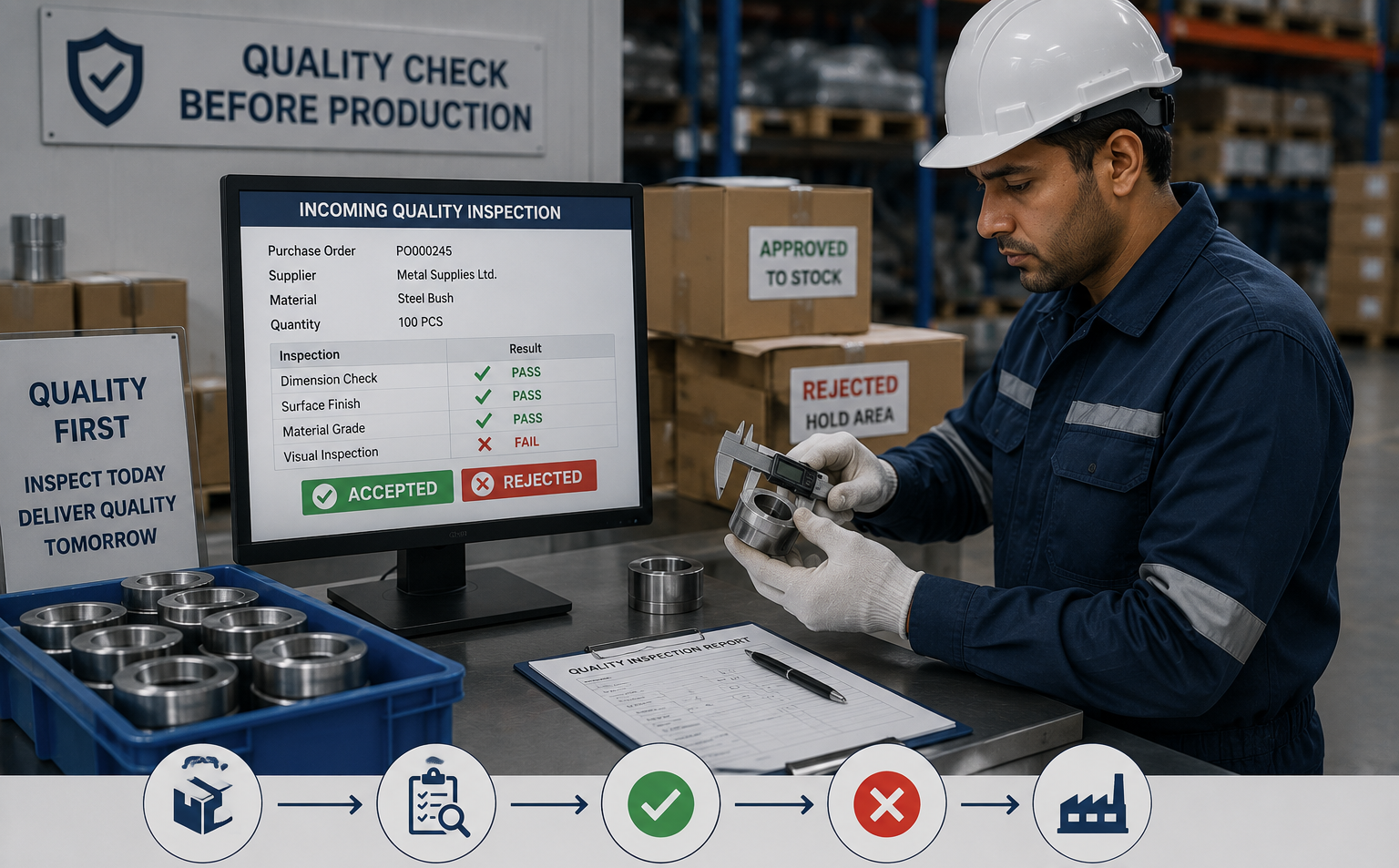
Step 11: Incoming Quality Inspection – Don’t Let Poor Materials Reach Production
Receiving raw materials doesn’t automatically mean they’re ready for production.
Imagine receiving 2,000 kilograms of steel, only to discover later that the thickness doesn’t meet your specifications.
Or imagine a food manufacturer accepting a batch of ingredients that fails quality standards.
The purchase was completed successfully, but production still stops.
That’s why procurement should always be connected with quality control.
Odoo’s Quality module allows manufacturers to define inspection checkpoints for incoming materials.
Depending on your process, inspectors can verify:
- Dimensions
- Weight
- Surface finish
- Chemical composition
- Batch details
- Packaging condition
- Expiry date
- Quantity received
The inspection result is recorded directly inside the ERP.
If the material passes inspection, it is released for production.
If it fails, Odoo can trigger predefined actions such as:
- Creating a Quality Alert
- Blocking the material from production
- Returning goods to the supplier
- Recording supplier quality history
This ensures that production teams work only with approved materials, reducing defects and avoiding costly rework.
Step 12: Inventory Becomes Available for Production Automatically
After the material passes quality inspection, Odoo completes the final stage of the procurement workflow.
The inventory becomes available for manufacturing without requiring separate data entry.
Production planners can immediately see that the required materials are now in stock.
Manufacturing Orders can proceed as planned.
Warehouse teams know where the materials are stored.
The purchase department knows the order has been completed.
Management can monitor the entire process through real-time dashboards.
At this point, procurement has become much more than purchasing.
It has become a connected business process where every department works with the same live information.
By now, you've seen that procurement in Odoo is much more than a single module or activity. It’s a connected workflow that links sales, production, inventory, purchasing, warehouse operations, and quality into one system.
Every stage is connected.
Every department works on the same data.
And most importantly, the system identifies procurement needs before they become production problems.
A Real Manufacturing Experience
At Teknovative Solution, we’ve noticed a similar pattern while working with manufacturing businesses across different industries.
One client wasn’t struggling because suppliers were unreliable.
The suppliers were delivering exactly as promised.
The real issue was internal coordination.
Production planning was managed in Excel.
Inventory was maintained separately.
The purchase team relied on emails and phone calls to understand changing production requirements.
Whenever the production schedule changed, procurement wasn’t updated immediately.
The result?
- Emergency purchases became routine.
- The same material was occasionally ordered twice.
- Critical components reached the factory late.
- Excess inventory blocked working capital.
- Production planning depended on daily follow-ups rather than real-time data.
After implementing Odoo ERP for Manufacturing, purchasing became directly linked with production planning and inventory.
The purchase team no longer had to guess what should be ordered.
Instead, they worked with live demand generated by the ERP.
Warehouse staff updated receipts in real time.
Production planners could instantly see incoming materials.
Management gained complete visibility into procurement performance through dashboards and reports.
The biggest improvement wasn’t just fewer material shortages.
It was confidence.
Every department trusted the same data, and purchasing decisions became proactive instead of reactive.
This is exactly how modern manufacturers reduce uncertainty and build a more predictable production process.
Ready to Make Procurement Smarter?
At Teknovative Solution, we don’t begin with software—we begin with your manufacturing process.
Business Benefits of Odoo Procurement Automation
Procurement automation isn’t just about purchasing materials faster. It helps manufacturers reduce production delays, improve inventory control, strengthen supplier relationships, and make data-driven decisions. By connecting every stage of the procurement process, Odoo ERP for Manufacturing enables businesses to operate more efficiently and respond quickly to changing production demands.
1. Prevents Production Delays:
With real-time inventory tracking, Material Requirement Planning (MRP), and Reordering Rules, Odoo ensures critical raw materials are available before production is affected. This helps keep manufacturing schedules on track and reduces last-minute disruptions.
2. Reduces Inventory Costs:
Maintaining the right stock levels is essential for healthy cash flow. Odoo helps manufacturers avoid both overstocking and stock-outs by purchasing materials based on actual demand instead of assumptions, reducing unnecessary inventory carrying costs.
3. Improves Purchase Planning:
Instead of reacting to shortages, purchase teams can plan procurement using live production schedules, sales orders, and inventory data. This results in fewer emergency purchases, better supplier coordination, and more predictable operations.
4. Strengthens Supplier Management:
Odoo stores supplier history, pricing, lead times, and delivery performance in one place. This allows buyers to compare vendors more effectively, negotiate better deals, and build long-term relationships with reliable suppliers.
5. Increases Team Productivity:
Automating repetitive tasks such as RFQ generation, purchase approvals, and inventory updates reduces manual work. Your teams spend less time on paperwork and follow-ups, allowing them to focus on planning, cost optimisation, and strategic decision-making.
6. Provides Complete Business Visibility:
Since purchasing, inventory, production, warehouse, and quality are connected in a single platform, management gets real-time insights into procurement performance. This improves decision-making, enhances accountability, and enables faster responses to changing business requirements.
Conclusion
Raw material shortages are often caused by delayed purchasing, poor inventory visibility, and disconnected production planning—not just supplier delays. Odoo ERP for Manufacturing brings purchasing, inventory, production, and warehouse operations into one integrated system. With features like MRP, Reordering Rules, automated RFQs, and real-time inventory tracking, manufacturers can ensure materials are available when needed, reduce production delays, optimise inventory, and make smarter procurement decisions for long-term operational efficiency.
Curious Minds Want to Know
Procurement automation is the process of using software to manage purchasing activities automatically. It helps manufacturers monitor inventory, generate purchase requests, manage supplier information, and place orders with minimal manual intervention.
Odoo ERP for Manufacturing continuously monitors inventory levels, analyses production demand through Material Requirement Planning (MRP), applies Reordering Rules, and generates procurement actions before stock shortages affect production.
Procurement automation primarily uses the Purchase, Inventory, Manufacturing (MRP), Quality, and Barcode modules. Together, these modules create a connected workflow from demand planning to goods receipt and production.
Yes. Odoo can automatically generate Requests for Quotation (RFQs) based on procurement rules. After approval, these RFQs can be converted into Purchase Orders quickly, reducing manual work and improving purchasing efficiency.
Yes. Odoo is highly scalable and is suitable for small, medium, and large manufacturing businesses. Companies can start with essential modules and expand the system as their operations grow.
Odoo provides real-time inventory visibility, warehouse tracking, batch and serial number management, demand forecasting, and automatic stock replenishment, helping manufacturers reduce stock-outs as well as excess inventory.
Yes. Odoo allows manufacturers to maintain multiple approved suppliers for a single product, compare pricing, track supplier performance, and make better purchasing decisions based on cost, delivery time, and historical performance.
Excel works well for maintaining data, but it cannot connect purchasing, inventory, production, quality, and warehouse operations in real time. Odoo provides a single integrated platform that improves visibility, reduces manual work, and supports better decision-making.
The implementation timeline depends on the size of the business, the number of modules, and process complexity. A well-planned implementation with proper business process analysis delivers much better long-term results than a rushed deployment.
If your business frequently faces raw material shortages, emergency purchases, excess inventory, production delays, or depends on Excel and manual follow-ups, it's time to automate your procurement process.