
Your Factory Has Data Everywhere. But Does It Have the Full Picture?
Your sales team says business is growing. Your production team says orders are piling up. Your purchasing team is chasing suppliers. And your finance team is still waiting for payments.
Everyone is busy. Everyone has information. Yet, when the owner asks one simple question
“Are we actually making money, and what is slowing our business down?”
the answer may take hours to find.
Sound familiar?
This is one challenge AI could help manufacturers address. Not by replacing every employee or automating every decision, but by helping people find connections between information that often sits across different departments.
What if your team could ask questions about sales, stock, production delays, and outstanding payments without manually collecting reports from multiple places?
That brings us to a bigger question: Can AI turn a manufacturing ERP from a system that records business activity into a tool that helps people make better decisions?
Let’s explore how Odoo 20 AI can assist manufacturing teams, where it can make a difference, and why human judgement still matters.
Why Do Manufacturing Teams Still Struggle to Get the Full Picture?
A manufacturing business doesn't operate in separate departments. A change in one department can influence operations across the business.
A sales commitment affects material requirements. Material availability affects production. Production delays affect dispatch. Dispatch affects invoicing, and delayed payments affect cash flow.
But when these departments rely on disconnected spreadsheets, manual updates, or separate systems, the connections become difficult to see.
For example, a salesperson may promise a delivery date without knowing that a critical component is out of stock. The production manager may discover the shortage only after the order enters the production queue.
By then, the business is already reacting to a problem instead of preventing it.
A connected ERP system helps organise the underlying business records. AI can add another layer by helping users find, summarise, and analyse information across those records, when the necessary access and tools are configured.
The difference is important: ERP connects business processes; AI can make some of that information easier to work with.

How AI Transforms Manufacturing Workflows in Odoo 20
1. Sales: Can AI Help Teams Understand Customer Enquiries Better?
Every manufacturing order begins with a business requirement. A customer might request a customised product, a specific quantity or specification, or an earlier delivery date.
Sales teams must collect these details before preparing a suitable quotation.
AI can help summarise customer conversations, identify missing information and organise relevant details when the appropriate tools and records are available.
For example, a salesperson might ask:
“Summarise this customer’s requirements, list the unanswered questions and identify the information needed before preparing a quotation.”
Instead of reviewing several messages manually, the salesperson can start with a structured summary and verify the details.
What about predicting whether a lead will convert?
AI may support sales analysis, but accurate lead-conversion prediction requires an appropriate prediction method and suitable historical data. It should not be assumed that every Odoo 20 setup automatically predicts whether a lead will be won or lost.
The practical benefit: AI can help sales teams organise information and prepare for customer conversations. Salespeople remain responsible for understanding customer needs and building relationships.
2. Quotation: Can We Offer the Right Price and Delivery Date?
Once the customer’s requirements are clear, the next question is whether the business can fulfil them at the expected price and within the requested timeline.
A quotation may depend on several factors:
- Product details and BOM records.
- Material costs and current stock.
- Supplier lead times.
- Production capacity and existing commitments.
- Pricing rules, margins, and payment terms.
An ERP system keeps product, sales, stock, and production information organised in one place. A configured AI workflow may help retrieve relevant information, highlight missing details, or prepare a quotation draft.
Consider a customer requesting a customised machine component. Before committing to a delivery date, the team needs to check whether the required raw material is available and whether production has capacity.
An AI-assisted workflow could help bring those questions together, provided it can access the required records.
However, AI should not be treated as an automatic guarantee that every enquiry will become a correct, approved quotation. Prices, specifications, discounts, and delivery commitments need appropriate validation.
The goal is to make better-informed commitments, not simply generate quotations faster.
3. Inventory and Purchasing: What Happens When Essential Materials Run Out?
A quotation is accepted. The customer confirms the order.
Now the business must ensure that the materials required for production are available at the right time.
A shortage may not be obvious from a simple stock total. Some quantities may already be reserved for other orders, while other materials may be on the way from suppliers.
A manufacturing ERP can help teams review:
- Available and reserved stock.
- Incoming materials and expected receipt dates.
- Material requirements for confirmed orders.
- Replenishment rules and purchase requirements.
- Pending supplier deliveries.
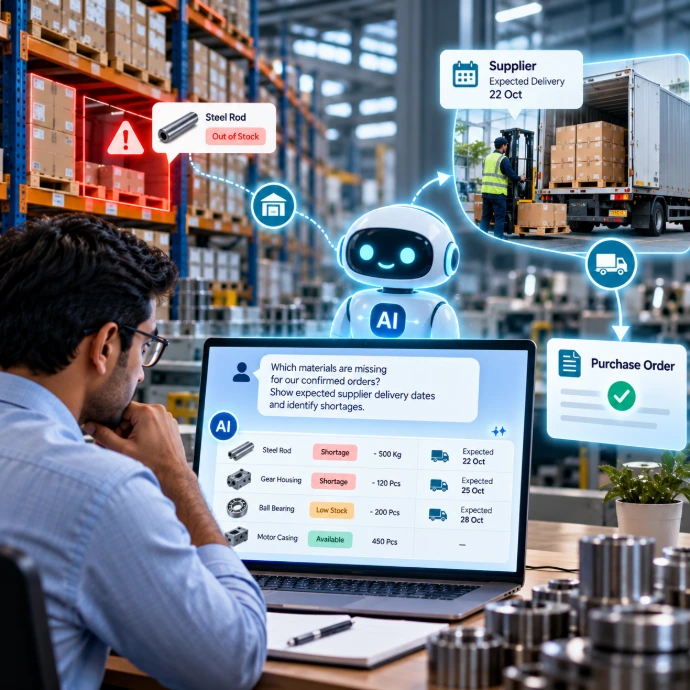
AI can help users investigate this information through natural-language questions when the relevant records and tools are accessible.
For example:
“Which materials are missing for our confirmed orders? Show expected supplier delivery dates and identify shortages that could affect production.”
This can help purchasing prioritise follow-ups and give production an earlier warning about potential delays.
Odoo’s Manufacturing application supports material and production workflows, while its AI MCP documentation describes ways compatible external AI agents can interact with authorised business records. The exact AI workflow depends on the setup.
What should remain under human control?
AI may help identify shortages or prepare recommendations. Purchasing managers must still consider supplier reliability, price, quality, lead times, and company approval rules.
A stock shortage is more than an inventory problem. It can affect sales commitments, production schedules, and customer satisfaction.
4. Production Planning: Can We Finish the Work on Time?
Available stock doesn't always mean an order is ready for production.
Machines may already be occupied. Work centres may have limited capacity. Existing jobs may be running late, and maintenance may affect the production schedule.
A manufacturing ERP software connects BOMs, production orders, work orders, work centres, and planning.
With accurate data, AI can help managers explore questions like:
- Which orders are waiting for materials?
- Which work centres have pending jobs?
- Which production orders are behind schedule?
- What could affect the planned completion date?
For example:
"Identify documented material shortages, delays, and work-center bottlenecks by analyzing pending production orders."
This helps the production manager focus on specific issues rather than collecting information from multiple screens.
Odoo 20’s MCP functionality allows compatible external AI agents to work with an Odoo database through authorised tools. It requires setup and should not be confused with an automatically available AI scheduler in every manufacturing installation.
AI can help investigate the schedule. The production manager still decides how to prioritise jobs, allocate resources, or revise commitments.
5. Shop-Floor Operations: Where Is Production Losing Time?
On paper, a production strategy might seem doable. Actual performance can be different.
A machine may stop unexpectedly. An operation may take longer than planned. Material wastage may increase, or a job may remain unfinished because an earlier process is delayed.
If these events are not recorded properly, managers may know that production is late without knowing where to investigate.
A useful manufacturing ERP software workflow captures relevant operational information, including:
- Planned versus completed quantities.
- Material consumption and recorded scrap.
- Work-centre downtime and production delays.
- Work in progress and pending operations.
- Quality issues and rework.
When the records are reliable, a manager can ask:
“Which production orders are behind schedule, and what reasons have been recorded for the delays?”
AI may help summarise the available information and identify patterns worth investigating. But it cannot reliably explain unrecorded events, and a pattern alone does not prove the root cause.
For instance, repeated delays on a particular work centre may justify an investigation. The actual reason could be maintenance, operator availability, material quality, or inaccurate planning.
Useful AI analysis begins with accurate shop-floor records.
6. Quality Control: Can One Quality Issue Be Traced Across the Business?
Suppose a batch of components fails inspection.
The quality team needs to determine which materials are affected, whether they have entered production, and which finished products might be at risk.
Without connected records, finding that information can involve multiple calls and manual checks.
A well-configured ERP can connect quality checks with product details, lot numbers, inventory movements, and production records. The business can also configure suitable alerts and approval steps.
AI may help summarise affected records or prepare information for investigation, if the required data is accessible.
It should not independently declare a failed batch acceptable or release restricted material without the appropriate controls.
A quality issue can impact far more than just the inspection department. It may change material availability, production priorities, delivery commitments, and product costs.
When quality information is connected to the wider workflow, teams can assess the impact sooner and make better-informed decisions.
Is Your Manufacturing Business Running on Guesswork?
Discover how connected ERP workflows and AI can help you identify production delays, inventory gaps, and business inefficiencies.
7. Dispatch and Finance: Does Shipping the Order Mean the Work Is Finished?
The products have passed inspection and are ready for dispatch.
But important business questions remain. Has the delivery been recorded? Does the order need invoicing? Has the customer paid? Are there overdue balances that need attention?
An integrated ERP workflow can connect the relevant sales, delivery, and accounting records, depending on the company’s configuration and invoicing process.
AI may help managers investigate questions such as:
- Which dispatched orders still need invoicing?
- Which customer invoices are overdue?
- How do this month’s sales and invoicing compare with the previous month?
- Which customers have outstanding balances and open orders?
Odoo’s AI MCP documentation includes examples involving invoice totals and comparisons between periods. These use cases depend on authorised database access and the tools exposed to the AI agent.
AI can help summarise financial information, but accounting accuracy, payment reconciliation, tax treatment and financial approvals still require appropriate processes and controls.
Why does this matter to a manufacturing owner?
A business can have a full order book and still face cash-flow pressure.
When dispatch and finance information is easier to review alongside sales records, managers can investigate delayed invoicing, overdue payments, and customer balances without relying entirely on separate manual reports.
8. Business Reporting: What If You Could Ask Instead of Building Another Report?
Business owners do not always need another dashboard. Sometimes, they need a clear answer to a specific question.
For example:
“Compare production delays this month with last month and show the main recorded reasons.”
Or:
“List customers with overdue invoices who also have open sales orders.”
Traditionally, answering these questions may involve selecting filters, exporting data, and combining information from different screens.
In a configured environment, AI can help users query and summarise business records in natural language. Odoo 20’s MCP integration supports interaction between compatible external AI agents and authorised Odoo tools.
However, natural-language reporting does not mean every question will produce a complete or correct answer automatically.
The system must have access to the required information. The records must be accurate, and users should be able to verify the results against the underlying data.
The value is not simply fewer clicks. It is making business information easier to investigate and act upon.
9. Customer Support: Does the Connection Continue After Dispatch?
A customer’s relationship with a manufacturer does not end when the goods are delivered.
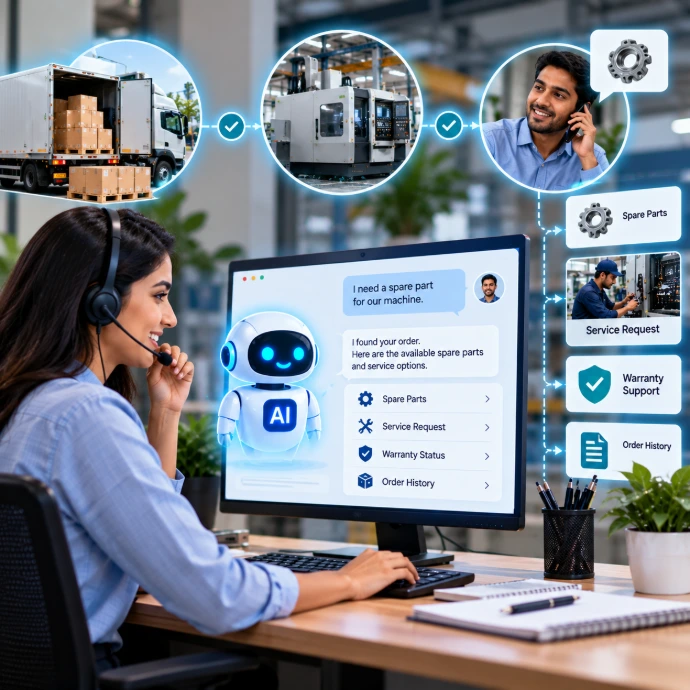
Customers may ask about spare parts, service requests, warranty processes, or the status of an earlier complaint. Support teams need access to relevant product and customer information to respond properly.
Odoo 20 documents AI integration with Live Chat. A configured AI agent can answer common questions, request additional information, and escalate conversations to a human when necessary.
For example, an AI agent may help collect a customer’s order reference and the details needed to register a service request. The support team can then review the request with the relevant context.
Complex technical issues, warranty assessments, and unusual complaints may still need expert human judgment.
The goal is not to eliminate human support. It is to help customers get appropriate answers while giving employees the information they need.
10. Website Management: Can AI Help You Modify Your Website in Odoo 20?
However, updating website content, refining page layouts, and making routine changes can take time, especially when multiple pages need attention.
With AI-assisted website editing capabilities in Odoo 20, users can make certain website changes using natural-language instructions, depending on the available features and configuration.
For example, businesses may be able to use AI assistance to:
- Update website content: Rewrite product descriptions, improve service page content, or make existing text clearer.
- Optimize Website Messaging: Refine headlines, calls to action, and other website copy to communicate the business offering more effectively.
- Modify website sections: Make supported changes to page content and layouts using the available website editing tools.
- Improve product pages: Update product information and descriptions to make them more useful for prospective customers.
- Support routine website maintenance: Reduce the manual effort involved in making supported content and design adjustments.
Imagine a manufacturer wants to update its CNC machining service page. Instead of manually rewriting every section, the team could use an AI-assisted editing workflow to improve the content and then review the changes before publishing.
However, AI-assisted website editing does not mean every design change, custom feature, or complex website modification can be completed automatically. Advanced layout changes, custom development, integrations, and technical troubleshooting may still require a developer.
The practical benefit is that AI can help simplify supported website editing tasks, allowing businesses to spend less time on routine updates and more time improving their online customer experience.
Read Also: Where Are Your Manufacturing Costs Going? How to Reduce Waste Without Lowering Quality
What Must Be in Place Before Using AI in Manufacturing ERP Software?
AI cannot compensate for every weakness in a business process. If product records are inconsistent, stock updates are missing, or departments follow unclear procedures, AI may produce incomplete or misleading results.
Before introducing AI, review five essentials.
1. Accurate business data:
Product codes, BOMs, stock quantities, supplier lead times, production updates, and accounting records should be maintained properly.
2. Connected workflows:
Understand how sales orders affect purchasing, inventory, production, dispatch, and invoicing. Decide where information should flow and where manual hand-offs can be reduced.
3. Clear access permissions:
AI agents should only access information and perform actions they are authorised to handle. Sensitive operations need appropriate restrictions.
4. Human review and approvals:
Define which tasks AI may assist with and which decisions require approval. This is particularly important for pricing, purchasing, production changes, quality decisions, and financial transactions.
5. Testing and operating costs:
Test realistic situations, including missing materials, delayed production, rejected batches, and overdue invoices. Review the expected benefits and the cost of maintaining the workflow.
Odoo 20’s release notes state that AI features require IAP credits, so this should also be considered when evaluating the cost of using them.
Rather than trying to automate every department at once, start with one recurring business problem. Test the workflow, measure the result, and expand only when the approach proves useful.
Can AI Really Connect Sales, Inventory, Production, and Accounting?
AI can help manufacturers work with information across departments, but meaningful results depend on connected workflows, reliable data, suitable permissions, and the right configuration.
Sales, purchasing, production, and Accounting do not work in isolation. A decision in one department can create a problem, or an opportunity, in another.
A connected ERP provides the business records and workflows. AI can help people explore that information, summarise relevant details, and support configured tasks.
For manufacturing businesses, the best starting point is not asking, “Where can we use AI?”
It is asking:
“Where does our team lose time, where does information get stuck, and which decisions would improve if we could see the full picture?”
Answer that first. Then decide where AI can make a practical difference.
Looking to Improve Your Manufacturing Workflows?
Before choosing an AI solution, understand how your current sales, inventory, production, and Accounting processes work together, and where they break down.
Teknovative Solution approaches ERP from the business workflow first, helping companies evaluate their processes before deciding what needs to change.
Explore ERP Consultation.
Curious Minds Want to Know
AI can help analyse information across these departments when the ERP records, integrations, permissions, and required tools are configured. The level of connection depends on the implementation.
AI-powered ERP combines business process management with AI-assisted tasks such as summarising records, answering questions about available data, and supporting configured workflows. Capabilities vary by ERP version and setup.
Odoo 20 documents AI agents, AI-supported automation, and MCP-based interaction between compatible external AI agents and authorised Odoo tools. Actual use cases vary based on system configuration, user permissions, and available data.
A configured AI workflow may help prepare a quotation or create relevant records. Product specifications, pricing, discounts, and delivery commitments should be validated before approval.
Lead-conversion prediction requires a suitable prediction method and relevant historical data. This capability should not be considered automatic or universally reliable across all ERP installations.
AI can help analyse accessible stock, demand, and supplier information to highlight potential shortages. Purchase quantities and supplier decisions should follow the company’s planning rules and approval process.
AI may support production planning and configured workflows, but reliable schedules depend on material availability, work-centre capacity, priorities, and accurate operational data. Human review may be needed before changes are applied.
Not necessarily. Companies should first establish accurate records and well-defined business workflows. AI can be introduced where it solves a clearly defined problem, and the expected benefits justify the cost and complexity.
Odoo 20's AI-assisted website editing capabilities may help users make supported changes to website content and page elements. The available functionality depends on the installed edition, configuration, and editing tools. Complex design changes and custom website development may still require technical expertise.
Ready to Make Your Manufacturing Business Smarter?
Let's identify where your business workflows are breaking down and explore how Odoo ERP and AI can help improve visibility, coordination, and decision-making.