
Picture a Tuesday in a growing business. Sales has one version of the customer list, accounts has another, the warehouse counts stock in a notebook and the owner learns about a delay when a customer complains. Nobody is careless. Each team simply has its own tool, and the tools do not talk to each other.
That mess is the reason people ask what is ERP software. In short, ERP stands for enterprise resource planning, and it is one system that connects your sales, purchase, stock, production and accounts. If you are just starting to explore it, an ERP consultation is a sensible way to check whether you need it at all. This guide explains the meaning, the modules, the benefits and the traps, in plain English.
What Is ERP Software? A Simple Definition
So, what is ERP software in one sentence? ERP software is a business system that stores data from every department in one shared database, so sales, purchasing, inventory, production, finance and HR work from the same facts. When something changes in one place, everyone sees it.
A good analogy is a shared kitchen. If every cook has a private fridge, nobody knows what is left and the soup gets salted twice. With one shared fridge and a clear list, the kitchen runs smoothly. That is what an ERP system does for a company. It does not replace your people, it gives them one source of truth.
How ERP Software Works
Under the hood, ERP software has two parts. First, a central database holds your customers, products, suppliers, prices and transactions. Second, modules sit on top of it, such as sales, inventory, manufacturing and accounting, and each one reads and writes to that same database.
Here is a quick example. A salesperson confirms an order. The system checks stock, creates a delivery, alerts purchasing if material is short, and prepares the invoice, all from that single entry. Nobody retypes anything, which means fewer errors and faster answers. That chain of automatic steps is what separates enterprise resource planning software from a collection of separate apps.
A Short History: From MRP to Modern ERP
ERP did not appear overnight. In the 1960s, manufacturers used material requirements planning, or MRP, to calculate what material to order. In the 1980s it grew into MRP II, which added capacity, labour and finance. The term ERP itself is generally credited to the analyst firm Gartner around 1990, when these systems began to cover the whole business, not only the factory floor.
Since then, ERP has moved from huge on-premise installations to cloud and modular platforms that smaller firms can afford. Open and modular systems, such as Odoo ERP software, made it possible for a 30-person business to start with two modules and grow from there. The idea is the same as in the 1960s, only far more accessible.
Core Modules You Will Find in ERP Software
Modules are the building blocks. You rarely need all of them on day one, so the smart move is to start with the ones that solve your biggest headache. The table below shows the most common modules and the problem each one solves.
Module | What it does | Problem it solves |
Sales and CRM | Tracks leads, quotes and orders | Lost enquiries, wrong prices |
Purchase | Manages vendors, RFQs and bills | Late or duplicate orders |
Inventory | Records every stock movement | Mismatched stock, dead stock |
Manufacturing | Plans production and bills of materials | Delays, wastage, poor costing |
Accounting | Handles invoices, GST and reports | Month-end chaos |
HR and payroll | Manages staff records and salaries | Manual attendance and payroll |
Five Signs Your Business Needs ERP Software
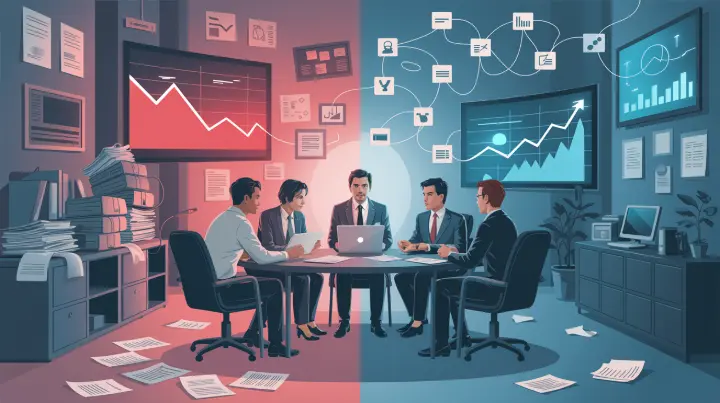
Not every business needs ERP tomorrow, and I would rather tell you that than sell you a system. Still, when I see these signs, the answer is usually yes. You do not need all five, and two or three is a strong signal.
Your team spends hours copying the same data into different sheets.
Stock in the system and stock on the shelf rarely match.
You cannot get a reliable profit figure per product or per job without days of work.
Growth is adding people, not profit, because processes are manual.
You find out about problems from customers instead of from your own reports.
ERP Software vs Excel: When Should You Switch?
Excel is brilliant, and I use it daily. It is also the reason many businesses delay ERP for years. The question is not whether Excel is bad but when it stops being enough. Spreadsheets suit one person tracking one thing, and they struggle when many people need the same live data.
Area | Excel and manual tools | ERP software |
Data | Many copies in many files | One shared database |
Updates | Manual, often delayed | Automatic and real time |
Errors | Easy to make and hard to trace | Reduced by validation and workflows |
Reporting | Built by hand each month | Generated from live data |
Growth | Gets slower as volume grows | Designed to scale in modules |
If your business has more than a few people touching orders, stock and money every day, the right time to look at ERP software is usually sooner than you think.
Look Inside a Modern Factory
See how top business owners control sales, purchase, and stock from one mobile screen.
Benefits of ERP Software for Indian Businesses
The benefits are easier to feel than to list. You get fewer errors, because data is entered once. You get faster decisions, because reports come from live numbers instead of last month's file. You get tighter cash control, since you can see stock, payables and receivables together. And you get a cleaner path to GST compliance, because invoices and stock records come from the same source.
There is also a quieter benefit: less owner dependency. When the system holds the process, the business no longer relies on one person remembering everything. For ERP for small manufacturing business setups especially, that is often the biggest gain, because the owner finally gets to step back from daily firefighting without losing control.
ERP Software and Digital Support for MSMEs in India
Indian small businesses are not on their own in this. In a 2021 written reply to the Rajya Sabha, the Ministry of MSME described the Digital MSME scheme as aiming to help MSMEs use software to improve internal efficiency, automate processes and cut costs. Scheme details change over time, so check the Ministry's current guidelines before planning around any support.
The direction of travel is clear, though. Software-driven operations are becoming normal for small and mid-sized firms, not a luxury for large groups. That is why the ERP question is shifting from "do we need it?" to "which parts do we start with?"
Cloud ERP Software vs On-Premise ERP Software
The next question is where the system lives. Cloud ERP software runs on a provider's servers and you access it through a browser. It usually needs less upfront hardware and makes updates and remote access easier. On-premise ERP software runs on your own servers, which gives you more direct control and can suit businesses with strict data rules or poor internet.
Neither is automatically better. I tell clients to decide based on internet reliability, data policy, budget and how much IT support they have in-house. Some platforms offer both, so you can start in one and move to the other later if your needs change.
How to Start with ERP Software Step by Step
The biggest mistake is trying to switch everything on at once. Start with the area that hurts most, prove the value and then widen the circle. A sensible plan looks like this:
List your current processes and mark where data is copied by hand.
Pick one or two modules for the first phase, such as inventory and sales.
Clean your product, customer and vendor data before moving it in.
Train the team, run the old and new methods side by side briefly, then go live.
Review results monthly and add the next module only when the first one is working.
If you want to see how a factory applies these steps with lean principles, our guide on lean manufacturing ERP shows what it looks like in practice.
Common Mistakes When Choosing ERP Software
After many projects, three mistakes repeat. The first is buying features instead of fixing a process. A shiny dashboard on top of a messy workflow just shows you the mess in higher resolution. The second is skipping data cleanup, so the new system faithfully reports four versions of the same product. The third is ignoring the people who will use it every day. If the storekeeper finds the new system slower than his register, he will quietly go back to the register.
Avoid those three, and your ERP software becomes part of daily work instead of a project that never ends. Involve users early, keep the first phase small and measure results against a baseline.
ERP Software in Action: A Real Example
Srivaru Motors Pvt. Ltd., an e-bike manufacturer, came to us with production delays, inaccurate inventory and slipping customer satisfaction. Our team at Teknovative Solution implemented an ERP covering production planning, inventory control and quality management. The client reported a 21 percent shorter production lead time, 25 percent lower inventory holding cost, 20 percent fewer defects and 95 percent on-time delivery within a year.
Those are the client's own reported figures, and every business starts from a different baseline, so treat them as a guide and not a guarantee. You can read the full case in our Srivaru Motors success story.
Final Thoughts on ERP Software
To sum up, what is ERP software? It is a single system that connects your departments through one shared database, so you get fewer errors, faster decisions and better control. It is built from modules you can add over time, it works best when introduced in phases with clean data, and it suits small and mid-sized firms as much as large ones. The Srivaru Motors results show what steady use can deliver.
If your business still runs on spreadsheets, phone calls and heroic memory, now is a good time to change that. Tell us where it hurts, and the team at Teknovative Solution will help you decide whether ERP is right for you and where to start. Contact us for a free consultation, and let us help you run a calmer, more profitable business.
Read Also: From Delays to Done-on-Time: How Engineering ERP Software Streamlines Workflow?
Is ERP Right For Your Business?
Talk to our expert to check if your business actually needs an ERP or if Excel is enough.
Curious Minds Want to Know
ERP software is one system that connects your sales, purchasing, stock, production, accounts and HR in a shared database. Instead of each team keeping its own file, everyone works from the same live information. That cuts duplicate entry and gives you faster, more reliable reports.
ERP stands for enterprise resource planning. The name reflects its purpose, which is to plan and manage the resources of a business, such as money, materials, people and machines, in one place. The term became common in the early 1990s as MRP systems expanded beyond manufacturing.
The most common modules are sales and CRM, purchase, inventory, manufacturing, accounting and HR. Most businesses start with the two or three that solve their biggest problem and add more later. A modular approach keeps cost and training manageable.
No. Modern cloud and modular platforms make ERP practical for small and mid-sized businesses too. The right approach is to start with a small scope, such as inventory and sales, prove the value and expand step by step instead of buying a full suite on day one.
There is no single price. Cost depends on the number of users, the modules you choose, the amount of customisation and whether you host in the cloud or on your own servers. The practical way to get a number is to scope one phase and ask for a fixed quote for it.